Key takeaways
- The Primera LX500c is the one inkjet color label printer verified on Amazon US, with a built-in cutter, 4800 dpi color and labels up to 4 by 24 inches.
An online seller who jars jam, pours candles, or bottles hot sauce eventually faces the same fork in the road: keep ordering pre-printed labels in bulk, or bring color label printing in-house. Thermal printers are cheap and fast, but they print in one color only, which rules out logos, product photos, and the shelf appeal that helps a small brand look established. A true inkjet color label printer removes that limit, letting you print full-color labels one at a time or in short runs whenever a batch is ready to ship.
This guide is written for marketplace sellers, small food and cosmetics brands, and anyone packing orders from a home studio. One honest note before the pick: this category is sold almost entirely through specialist resellers, and the Amazon US shelf for inkjet color label printers is extremely thin. Checking names and specs across Amazon pages, only one printer verified as listed there: the Primera LX500c. The sections below explain how to judge it and what to confirm before ordering.
Quick Picks
As an Amazon Associate we earn from qualifying purchases
| Product | Best for | Key spec from title |
|---|---|---|
| Primera LX500c Color Label Printer | Short-run full-color product labels printed at the packing bench | 4800 DPI printing with built-in cutter |
How to Choose
Inkjet Color Versus Thermal Printing
The first decision is the printing method itself, because it decides what your labels can look like. A thermal printer uses heat on coated label stock, needs no ink, and prints in a single color, which is fine for barcodes and shipping addresses. An inkjet machine lays liquid ink onto the label, so it can reproduce a logo, a product photo, and color-coded flavor or scent names in one pass. If your packaging depends on color to sell the product, inkjet is the only route of the two. The LX500c is an inkjet printer that runs on one dye-based color cartridge, so every label it produces is full color by design rather than an upgrade or add-on.
Label Width and Length Limits
Measure your widest label before you look at any printer, because media size is a hard ceiling that no setting can stretch. The LX500c prints labels up to 4 inches wide and 24 inches long, a range that covers most jars, bottles, tins, pouches, and small boxes sold online. A candle label that wraps a tumbler, a nutrition panel for a sauce bottle, and a front label for a soap box all sit inside that window. If your packaging needs labels wider than 4 inches, you are shopping for a larger machine, and those wider models are generally sold through specialist label-equipment resellers rather than on Amazon. Match the roll width to the printer first, then worry about everything else.
A Built-In Cutter Versus Perforated Rolls
How finished labels leave the printer matters more than most first-time buyers expect. With a built-in cutter, the machine trims each label or each batch cleanly, so labels come off the roll ready to apply with straight edges. Without one, you tear labels at perforations or trim them by hand, which slows packing and shows on the finished product. The LX500c carries a built-in guillotine-style cutter as part of the machine. Watch the model number here: the cutter version is model 74275, while the plain LX500 without a cutter is model 74273. The family name looks nearly identical on a listing, so confirm the number before you order.
Ink Cartridge and Included Software
Running costs and setup effort hide in the ink system and the software bundle. The LX500c uses a single dye-based color cartridge, and one cartridge is included in the box, which keeps ordering simple: there is one ink item to stock, though the colors are consumed together rather than one at a time. For design work, the listing includes BarTender UltraLite Primera Edition software, so you can lay out labels with text, barcodes, and artwork without buying a separate program. The printer connects by USB, and a USB 2.0 cable is included, along with a first roll of labels, so the machine can print on the day it arrives.
The Best Option
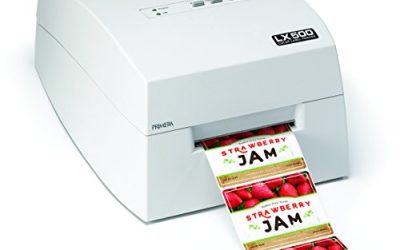
Primera LX500c Color Label Printer with Built-In Cutter
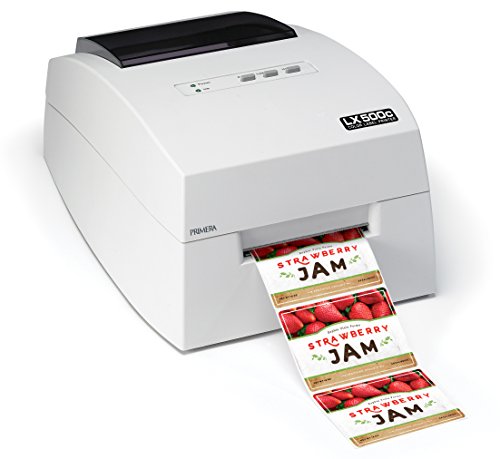
The LX500c earns this spot because it is the one genuine inkjet color label printer with a verifiable, current Amazon US listing, and its spec sheet lines up with what online sellers actually print. It produces full-color labels at up to 4800 x 1200 dpi, handles media as wide as 4 inches and as long as 24 inches, and cuts finished labels with its built-in guillotine cutter. A single dye-based color cartridge keeps the ink system simple, and the included BarTender UltraLite software covers label design without extra purchases.
Primera sells this model as the 74275, the cutter-equipped member of the LX500 family, and that distinction is the detail to hold onto when comparing listings. The spec table allows up to 1000 copies in a single run, which suits batch printing for a market weekend or a seasonal product drop, and the USB connection keeps setup to one cable between the printer and the computer that runs your shop.
Specs
- Printing technology: Inkjet
- Printer output: Color
- Maximum color print resolution: 4800 x 1200 dpi
- Maximum label size: 4 inches wide by 24 inches long
- Built-in cutter: Yes, guillotine-style
- Ink: One dye-based color cartridge, included
- Connectivity: USB, with a USB 2.0 cable included
- Included in the box: First roll of labels, BarTender UltraLite Primera Edition software
- Maximum copies per run: 1000
- Power consumption: 60 watts
- Model number: 74275
Best for: Online sellers printing short runs of full-color product labels up to 4 inches wide, at the bench where orders are packed.
Watch out for: Stock on this listing runs low, so check the live Amazon listing before planning a product launch around it, and confirm the listing shows model 74275 with the cutter rather than the plain LX500.
Which One Fits Your Situation
You Sell Candles, Jams, or Cosmetics in Small Batches
Small-batch makers change scents, flavors, and seasonal designs too often for bulk pre-printed labels to make sense. The LX500c fits this rhythm because it prints full-color labels in short runs, up to 1000 copies at a time, so a weekend batch of candles or a limited jam flavor gets its own label without a leftover roll. The 4-inch width covers most jars and tins, and the built-in cutter hands you finished labels ready to apply while the batch cools.
You Are Moving From Plain Thermal Labels to Branded Ones
If your products currently ship with one-color thermal labels, the jump to inkjet color is what turns a plain jar into a branded product. The LX500c makes that move in one machine: color printing, a cutter, design software, ink, and a first roll of labels are all in the box. Keep the thermal printer for shipping labels and addresses, and let the Primera handle the labels customers actually see on the shelf, the market table, or the unboxing photo.
Your Label Designs Change With Every Season
Sellers who rotate designs for holidays, markets, and limited runs waste money on pre-printed stock that expires with the season. Printing in-house with the LX500c means a new design costs you only the labels and ink for the quantity you need, printed the same day. Because the machine connects by USB to the computer running your design files, updating artwork is a file change rather than a new print order, and the cutter keeps short experimental runs tidy.
You Need One Machine Beside the Packing Bench
A home packing station has no room for a fleet of devices, so the printer has to earn its footprint. The LX500c combines printing and cutting in a single unit, draws 60 watts, and connects with one USB cable, which suits a bench that also holds a scale, tape, and boxes. Having the printer where orders are packed shortens the loop between printing, applying, and sealing the box, and the included first roll means the bench works from day one.
Common Mistakes
- Buying a thermal label printer and expecting color output, then discovering it prints one color only after the labels are already on products and the product photos no longer match the packaging.
- Ordering the plain LX500, model 74273, when you wanted the cutter version, model 74275; the names are nearly identical, so check the model number on the listing.
- Buying label rolls wider than 4 inches for a printer whose maximum media size is 4 inches by 24 inches, leaving stock you cannot feed through the machine.
- Assuming every inkjet label printer brand is sold on Amazon; most of this category moves through specialist resellers, so an Amazon listing for a given model may not exist at all, no matter how established the brand is elsewhere.
- Building a product launch around this printer without checking the live listing first, since stock on the LX500c listing has been seen running low, and a sold-out page on launch week leaves a batch of products with no labels.
Frequently Asked Questions
What is the difference between the LX500c and the LX500?
The difference is the cutter. The LX500c, model 74275, has a built-in guillotine-style cutter that trims finished labels as they come off the roll. The plain LX500, model 74273, leaves you to tear or trim labels yourself. Both names appear on listings in similar wording, so the reliable check is the model number: 74275 for the cutter version covered here, 74273 for the version without one.
What comes in the box with the LX500c?
The listing includes the printer with one dye-based color ink cartridge, a first roll of labels, a USB 2.0 cable, and BarTender UltraLite Primera Edition label design software. That bundle covers the full chain from designing a label to printing and cutting it, so a seller can produce finished labels on the day the machine arrives without ordering supplies separately first.
How large a label can the LX500c print?
The maximum media size on the listing is 4 inches wide by 24 inches long, at a maximum color resolution of 4800 x 1200 dpi. That window covers the labels most online sellers use: jar and bottle fronts, wrap labels for candles, nutrition and ingredient panels, and box labels for soaps and cosmetics. Anything wider than 4 inches needs a different, larger machine.
Why are there so few inkjet color label printers on Amazon?
This category sells mainly through specialist label-equipment resellers, not general marketplaces. Inkjet label lines from other brands sit with those resellers and have no Amazon US listing behind them, so they cannot be bought or linked through Amazon at all. The LX500c is the exception that verified as listed, which is why this guide covers one printer honestly instead of padding the page with models Amazon does not sell.