Key takeaways
- Compare three dye color label printers for online sellers, from compact short-run printing to print-and-cut shapes and wide-format daily volume.
Choosing a dye color label printer is really a decision about control: keep ordering pre-printed rolls and you accept minimum quantities, locked artwork, and a shelf of obsolete labels every time an ingredient, scent, or size changes. Print in-house and the question shifts to hardware — how wide your labels are, how many you run in a day, and whether your designs are plain rectangles or shapes that need cutting. Those three answers, not headline resolution numbers, separate the printers below.
This roundup is for online sellers — marketplace shops, candle and soap makers, small-batch food brands, and cosmetics sellers — who want shelf-ready color labels without a print shop. Every pick is a dye-inkjet color label printer sold on Amazon, and the selection comes straight from what the Amazon listings state: print width, cutter type, ink system, and rated output. The three models cover compact short runs, print-and-cut shapes, and wide-format daily volume.
Quick Picks
As an Amazon Associate we earn from qualifying purchases
| Product | Best for | Key spec from title |
|---|---|---|
| Primera LX500 Color Label Printer | Short runs of standard product labels on a crowded packing bench | Full-color product labels printed on demand |
| Primera LX610 Color Inkjet Label Printer with Plotter Cutter | Custom-shaped stickers, seals, and jar-lid labels | Print and cut any label shape, up to 5 in wide |
| Primera LX910 Color Label Printer | Wide labels and high daily volume across many products | Prints up to 8.25 in wide |
How to Choose
Print Width and the Labels You Actually Sell
Start with the widest label you sell today, not the average. A four-inch-class machine covers most candle jars, spice tins, and soap wraps, but it cannot grow with you into wide coffee bags or large bottle fronts. Measure your biggest SKU’s label, add the shapes you plan to launch next season, and buy for that width. Also check the printable width rather than the media width in a listing — the two differ, and a roll that fits the printer is not always printable edge to edge.
Dye Ink and Cartridge Design
Dye ink is what gives these printers their saturated, photo-style color on gloss label stock, and every model here ships set up for dye. Look at how the ink is packaged. A single tri-color cartridge is simple to swap and keeps the machine compact, but when one color runs out the whole cartridge is done, which raises the cost of color-heavy designs. Interchangeable systems let you switch a printer between dye and pigment later, though never both at once, so decide which ink family your products need before the first cartridge goes in.
Cutter Style and Finishing
How a printer finishes a label matters as much as how it prints. A basic built-in cutter slices each label or strip from the roll, which suits rectangular labels applied by hand. A plotter cutter goes further: it follows the outline of your artwork, so circles, seals, and custom sticker shapes come off the roll ready to peel. If your branding leans on shaped labels, print-and-cut is the feature to pay for. If every label you own is a rectangle, that money is better spent on width or ink.
Daily Volume and Running Costs
Match the machine to your busiest week, not your quietest. Compact dye printers are built for short runs — a few hundred labels between other jobs — while wide-format models are rated for thousands of labels a day and faster top speeds. Running a small printer at its limit all day wears it out and eats staff time; running an oversized one for twenty labels a week wastes money. Add the ongoing costs to the comparison: high-yield dye cartridges, inkjet-coated label stock, and the design software your team already knows.
The 3 Best Options
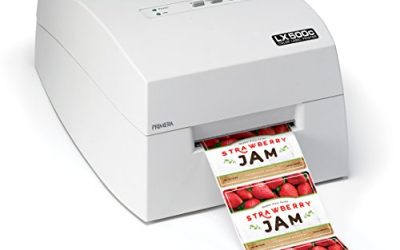
Primera LX500 Color Label Printer

The LX500 is the entry point for sellers who print labels in short bursts between packing orders. It is a dye-only machine built around one tri-color cartridge, so setup is simple and the color on gloss stock looks rich enough for candle jars, soap, and small-batch food packaging. Primera’s Amazon listing bundles the design software, a starter roll of high-gloss labels, and the USB cable, which means a new shop can print its first sellable labels the day the box arrives. Its compact footprint suits a bench that is already crowded.
Specs
- Ink: single dye-based tri-color cartridge (Primera 53374)
- Included software: BarTender UltraLite Primera Edition
- In the box: starter roll of 4″ x 3″ Tuff-Coat High-Gloss Inkjet label stock and a USB 2.0 cable
- Drivers: Windows 7/8/10+ and Mac OS X 10.6 or higher
Best for: new sellers printing short runs of standard rectangular product labels.
Watch out for: this listing is the base configuration — confirm whether a built-in cutter is included before ordering, since the cutter version is sold as a separate configuration.
ASIN: B01BWB9XLW
Primera LX610 Color Inkjet Label Printer with Plotter Cutter
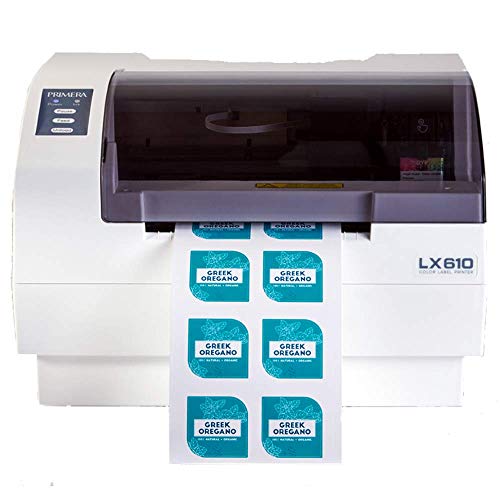
The LX610 exists for sellers whose labels are shapes, not rectangles. Its built-in plotter cutter trims each label to your artwork’s outline right after printing, so round seals, jar lids, and logo stickers come off the roll finished. It prints up to five inches wide on a single CMY cartridge system that ships in dye, with a pigment option in the same family if a product line later needs it. For sticker-led brands and gift packaging, that print-and-cut step replaces a separate cutting machine and a lot of hand trimming.
Specs
- Model: 74541
- Max print width: up to 5 in
- Cutter: built-in plotter cutter that prints and cuts any label shape or size in one machine
- Ink: single CMY cartridge; dye standard, with a pigment option
Best for: sticker-style and custom-shaped labels for jars, bottles, and packaging seals.
Watch out for: the die-cutting width is narrower than the full print width — check your widest shaped design against the cutting width before ordering.
ASIN: B086PM4D25
Primera LX910 Color Label Printer
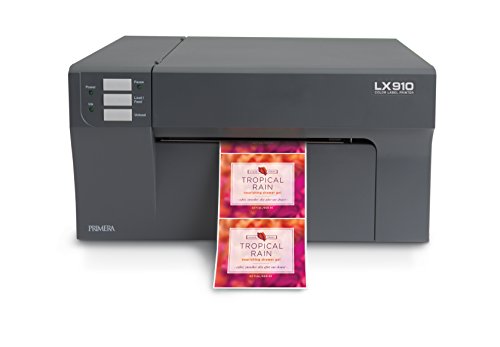
The LX910 is the step up for shops that have outgrown narrow labels and short runs. It prints up to 8.25 inches wide, so one machine covers everything from lip balm tubes to large jars and shipping-carton branding, and Primera rates it for up to 5,000 labels a day in its Amazon answers. A single CMY cartridge keeps operation simple, and the inks are interchangeable: the printer ships with dye for vivid color, and a pigment cartridge can be fitted instead if a line needs maximum water and fade resistance.
Specs
- Model: 74416
- Max print width: 8.25 in
- Print resolution: up to 1200 x 4800 dpi
- Print speed: up to 4.5 in/sec
- Ink: single CMY cartridge with interchangeable dye and pigment inks; ships with dye
- Cutter: built-in cutter
- Connectivity: USB 2.0
- Rated volume: up to 5,000 labels per day
Best for: growing shops printing wide labels or daily runs in the thousands.
Watch out for: it uses one combined CMY cartridge — if one color runs dry you replace the whole cartridge, so check the high-yield dye cartridge for this model against your running-cost math.
ASIN: B07D94MGBP
Which One Fits Your Situation
You print a few hundred labels a week for jars and tins
Pick the Primera LX500. Your runs are short, your labels are standard rectangles, and the bundled software and starter roll remove the usual setup friction. The single dye cartridge keeps the workflow to one swap, and the compact body leaves room on the packing bench for scales, boxes, and the products themselves.
Your labels are circles, seals, and custom shapes
Pick the Primera LX610. The plotter cutter is the whole point: it prints your artwork and cuts its outline in the same pass, which no straight cutter can do. If your brand sells through shaped stickers, tamper seals, or jar-lid labels, this is the only pick here that produces them without a second machine.
You run thousands of labels a day across many products
Pick the Primera LX910. The 8.25-inch width covers your largest packaging, the rated daily volume matches a real production schedule, and the top print speed keeps long runs from swallowing the workday. One cartridge system also simplifies training when more than one person shares the machine during peak season and sales events.
You are replacing pre-printed label rolls for the first time
Start with the Primera LX500 unless your widest label or your shapes say otherwise. First-time in-house printing is mostly about learning stock, software, and color on your real products, and the smallest machine teaches those lessons at the lowest commitment. Move up to the LX610 for shapes or the LX910 for width only when a real product demands it.
Common Mistakes
- Buying a monochrome thermal shipping label printer for product labels — it cannot print color at all; keep thermal for shipping and dye inkjet for the labels customers actually see.
- Loading ordinary or thermal label stock into a dye inkjet printer — dye ink needs inkjet-coated media, and on the wrong stock it smears, pools, and rubs off.
- Forgetting the single-cartridge math — on a tri-color cartridge, one empty color means replacing all three, so very color-heavy designs cost more than expected.
- Planning to mix dye and pigment in the same printer — interchangeable systems still run one ink type at a time, so switching means committing the machine to that cartridge.
- Designing a label wider than the cutting width on a print-and-cut model — the shape you draw has to fit the cutter’s working width, not just the printer’s.
Frequently Asked Questions
Are dye ink labels water-resistant enough for jars and bottles?
Dye labels on the right stock hold up well in daily use. Primera rates its dye ink as highly water-resistant on gloss synthetic stock such as BOPP, which suits fridge items, candles near sinks, and bath products. Plain paper labels are the weak point: they wick moisture and scuff, so match the stock to where the product will live.
What is the difference between dye and pigment ink for product labels?
Dye ink soaks into the label coating and produces the vivid, photo-style color these printers are known for. Pigment ink sits on the surface instead, which trades a little vibrancy for stronger resistance to water, chemicals, and fading. The printers here ship with dye; some accept a pigment cartridge later, but only one type at a time.
Can one of these printers also handle my shipping labels?
It can print addresses and barcodes, but it is rarely the smart tool for the job. Inkjet labels cost more per piece than thermal labels, and carrier labels do not need color. Most sellers run a dye printer for product labels beside an inexpensive thermal printer for shipping, and each machine does the work it is cheapest at.
Which label stock should I order with my first printer?
Start with the finish your products need most: high-gloss inkjet-coated paper for vivid shelf color, matte for a softer handmade look, or gloss BOPP synthetic when labels face moisture. Confirm the roll’s core size and outer diameter match your printer before ordering in quantity, and run one small roll through real products before committing to a full case.