Key takeaways
- Looking for the best motherboard for two graphics cards? Compare dual PCIe x16 boards with SLI and CrossFireX support, strong power stages and dual M.2 slots.
Running two graphics cards in one PC is a niche plan these days, but it still makes sense for certain builders: workstation rendering, GPU compute, simulation work, or squeezing more life out of an existing card by pairing it with a second one. The catch is that the motherboard decides whether that plan works at all. You need two full-length PCIe x16 slots with enough physical spacing, lane allocation that does not cripple both cards, and explicit multi-GPU support for NVIDIA SLI or AMD CrossFireX. Most mainstream boards quietly drop one or more of those requirements, so picking the right platform matters more than picking the cards themselves.
This guide is for builders who already know they want a dual-GPU setup and need a board that supports it properly. The three motherboards below were chosen from their Amazon listing names and stated specifications only: each one lists two PCIe x16 slots and named SLI and CrossFireX support, which is the non-negotiable baseline for a two-card build. Two of the picks are AMD AM4 boards, and one is an Intel LGA 1200 board, so there is an option on each side of the CPU divide.
Quick Picks
Our Short List of 3
- Best for: AMD builders who want Gen4 bandwidth on both cards and a clean, workstation-friendly board.
- Brand: ASUS
- Model Number: 90MB11B0-M0EAY0
- Socket / chipset: AMD AM4, X570
- Form factor: ATX
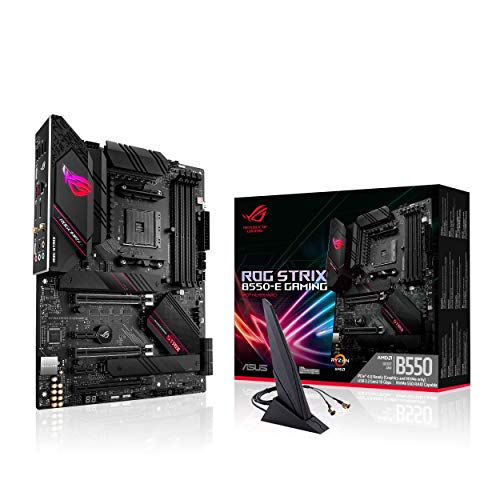
- Best for: AMD gaming builders who want SLI and CrossFireX support without giving up WiFi 6 and 2.5Gb networking.
- Brand: ASUS
- Model Number: ROG Strix B550-E Gaming
- Socket / chipset: AMD AM4, B550
- Form factor: ATX
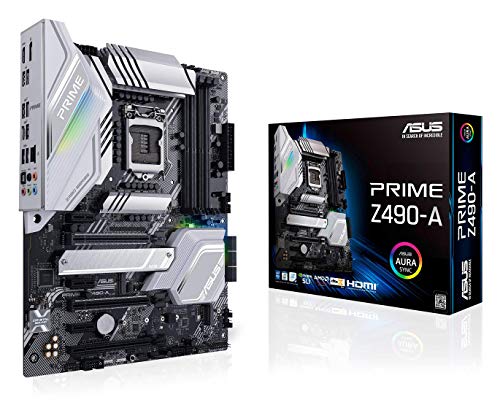
- Best for: Intel 10th Gen builders who need dual-GPU support plus Thunderbolt 3 and strong power delivery.
- Brand: ASUS
- Model Number: Prime Z490-A
- Socket / chipset: Intel LGA 1200, Z490
- Form factor: ATX
All 3 Picks at a Glance
| Product | Specs | Action |
|---|---|---|
| ASUS Prime X570-Pro |
| Check price on Amazon |
| ASUS ROG Strix B550-E Gaming |
| Check price on Amazon |
| ASUS Prime Z490-A |
| Check price on Amazon |
How to Choose
Slot layout and lane allocation
The first thing to check is how the two x16 slots share bandwidth. On all three boards here, a single card runs at x16, but installing a second card drops both slots to x8. That dual x8 split is normal for this class of board and is rarely a real-world bottleneck for gaming, but it matters for compute workloads that move large data sets between cards. Also confirm the physical spacing: thick coolers on the top card can crowd the second slot, and a third x16-length slot running at x4 mode, like the extra slot on the X570-Pro and Z490-A, is useful for a capture card or fast add-in storage rather than a third GPU.
SLI versus CrossFireX support
Multi-GPU support is not automatic just because a board has two x16 slots. NVIDIA SLI requires the board maker to license and certify it, and AMD CrossFireX needs chipset-level support. Every board in this guide explicitly lists both: the X570-Pro and Z490-A support 2-Way NVIDIA SLI and 3-Way AMD CrossFireX, while the B550-E supports 2-Way SLI and 3-Way CrossFireX. If a listing does not name SLI or CrossFireX, assume two cards will run independently rather than as a linked pair, which changes what the setup can do.
Power delivery and cooling headroom
Two graphics cards pull serious current and dump a lot of heat into the case, so the board’s power design matters even though the GPUs draw most of their power directly from the PSU. Strong CPU power stages, such as the 14+2 configuration on the B550-E or the 14 DrMOS stages on the Z490-A, keep the processor stable when the whole system is under combined load. You should also plan case airflow around the cards: the upper GPU will run hotter because the lower card blocks its intake, and no motherboard feature fixes poor ventilation.
Platform, storage, and connectivity
Dual-GPU builds tend to be long-term systems, so the rest of the platform should not become the next bottleneck. All three boards here include dual M.2 slots for fast NVMe storage, which keeps game libraries and project files off slower SATA drives. Networking differs: the B550-E adds WiFi 6 and 2.5Gb Ethernet, the Z490-A offers 2.5Gb Ethernet and Thunderbolt 3 support, and the X570-Pro focuses on USB 3.2 Gen 2 and SATA connectivity. Finally, match the socket to your CPU first: AM4 boards take AMD Ryzen processors, while the Z490-A is limited to Intel 10th Gen chips.
The 3 Best Options
ASUS Prime X570-Pro
- Best for: AMD builders who want Gen4 bandwidth on both cards and a clean, workstation-friendly board.
- Brand: ASUS
- Model Number: 90MB11B0-M0EAY0
- Socket / chipset: AMD AM4, X570
- Form factor: ATX
AMD builders who want Gen4 bandwidth on both cards and a clean, workstation-friendly board.
The AM4 platform is a mature, end-of-line socket, so there is no upgrade path to newer Ryzen generations on this board.
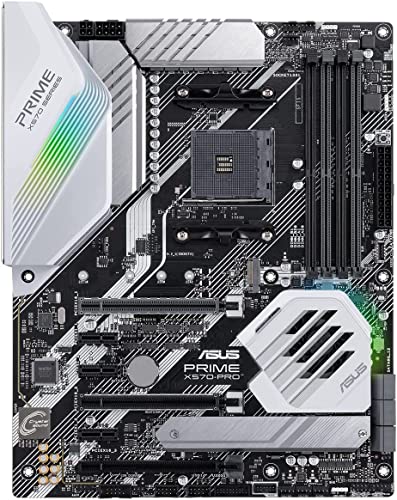
The ASUS Prime X570-Pro is the most straightforward pick for an AMD-based dual-GPU build because the X570 chipset gives it PCIe 4.0 across both main slots. With one card installed, the primary slot runs at x16; add a second card and the pair splits to dual x8, both at Gen4 speed, which doubles the per-lane bandwidth compared with a Gen3 board running the same split. ASUS lists support for 2-Way NVIDIA SLI and 3-Way or 2-Way AMD CrossFireX, so it covers both multi-GPU ecosystems without qualification.
Beyond the GPU slots, the X570-Pro is built like a workstation-leaning board rather than a stripped gaming model. A third PCIe 4.0 x16 slot running at x4 mode gives you room for an expansion card alongside the two GPUs, dual M.2 slots handle fast storage, and the four DIMM slots support up to 128GB of DDR4 memory for memory-hungry rendering or virtualization work. Its plain, non-gaming styling also suits professional builds where the PC needs to look at home in an office or studio.
Watch out for: The AM4 platform is a mature, end-of-line socket, so there is no upgrade path to newer Ryzen generations on this board.
ASUS ROG Strix B550-E Gaming
- Best for: AMD gaming builders who want SLI and CrossFireX support without giving up WiFi 6 and 2.5Gb networking.
- Brand: ASUS
- Model Number: ROG Strix B550-E Gaming
- Socket / chipset: AMD AM4, B550
- Form factor: ATX
AMD gaming builders who want SLI and CrossFireX support without giving up WiFi 6 and 2.5Gb networking.
Like the X570-Pro, it uses the AM4 socket, so CPU upgrades stop at the Ryzen 5000 generation.
The ASUS ROG Strix B550-E Gaming brings dual-GPU support to the B550 chipset, which is notable because many B550 boards omit SLI certification entirely. Its two PCIe 4.0 x16 SafeSlots run at x16 with one card or dual x8 with two, and ASUS lists 2-Way NVIDIA SLI and 3-Way AMD CrossFireX support. The SafeSlot design reinforces the slots, a practical touch when heavy flagship cards are hanging off the board in a vertical stack.
Where the B550-E pulls ahead of the X570-Pro is everyday connectivity and power hardware. A 14+2 power stage design feeds the CPU, dual M.2 slots come with heatsinks to keep NVMe drives cool under sustained transfers, and the networking package pairs WiFi 6 with an Intel 2.5Gb Ethernet controller. A front-panel USB 3.2 Type-C connector rounds out a feature set aimed squarely at gaming rigs that double as general-purpose machines.
Watch out for: Like the X570-Pro, it uses the AM4 socket, so CPU upgrades stop at the Ryzen 5000 generation.
ASUS Prime Z490-A
- Best for: Intel 10th Gen builders who need dual-GPU support plus Thunderbolt 3 and strong power delivery.
- Brand: ASUS
- Model Number: Prime Z490-A
- Socket / chipset: Intel LGA 1200, Z490
- Form factor: ATX
Intel 10th Gen builders who need dual-GPU support plus Thunderbolt 3 and strong power delivery.
The Z490 platform is tied to Intel 10th Gen processors, and its PCIe 3.0 slots offer half the per-lane bandwidth of the Gen4 slots on the two AMD boards.
The ASUS Prime Z490-A is the Intel option in this guide, built for 10th Gen Core processors on the LGA 1200 socket. It provides two PCIe 3.0 x16 slots that run in x16 mode, a third PCIe 3.0 x16 slot in x4 mode, and three PCIe 3.0 x1 slots for smaller add-in cards. Multi-GPU support covers 2-Way NVIDIA SLI and 3-Way AMD CrossFireX, matching the AMD boards here feature for feature on the dual-card front.
The rest of the specification suits a serious dual-purpose build. Fourteen DrMOS power stages supply the CPU, dual M.2 slots cover fast storage, Intel 2.5Gb Ethernet handles wired networking, and Thunderbolt 3 support opens the door to high-speed external devices and docks. A USB 3.2 front-panel Type-C connector keeps case connectivity current. For builders committed to an Intel 10th Gen chip who still want two graphics cards, this is the natural home for that combination.
Watch out for: The Z490 platform is tied to Intel 10th Gen processors, and its PCIe 3.0 slots offer half the per-lane bandwidth of the Gen4 slots on the two AMD boards.
Which One Fits Your Situation
You are building an AMD workstation for rendering or compute
Choose the ASUS Prime X570-Pro. Its Gen4 dual x8 split gives both cards the most bandwidth available in this group, the extra x4-mode slot leaves room for an accelerator or capture card, and support for up to 128GB of memory suits large scenes and data sets.
You game on AMD and want one PC that does everything
Choose the ASUS ROG Strix B550-E Gaming. It keeps full SLI and CrossFireX support while adding the features a daily-driver gaming PC benefits from most: WiFi 6, 2.5Gb Ethernet, reinforced SafeSlots, and M.2 heatsinks.
You already own an Intel 10th Gen CPU
Choose the ASUS Prime Z490-A. It is the only board here that fits your processor, and it does not ask you to compromise on multi-GPU support, power stages, or storage to use it.
You are deciding between platforms from scratch
Start with the GPU workload, not the CPU. If your software scales across two cards in SLI or CrossFireX, any of these boards qualifies, so let the CPU you prefer make the final call: Ryzen on AM4 points to the X570-Pro or B550-E, while a 10th Gen Intel chip points to the Z490-A.
Common Mistakes
- Assuming any board with two x16 slots supports SLI or CrossFireX. Without explicit certification in the listing, two cards will not link together.
- Ignoring the dual x8 split. Both cards drop to x8 when paired on boards in this class, so plan expectations and workloads around that.
- Undersizing the power supply. Two graphics cards plus a high-end CPU can exceed what a mid-range PSU delivers, especially under combined load.
- Forgetting case airflow. The upper card’s fans sit close to the lower card, and dual-GPU builds run noticeably hotter than single-card systems.
- Buying for a socket you do not own. AM4 and LGA 1200 boards are not interchangeable, and the Z490-A only accepts Intel 10th Gen processors.
Frequently Asked Questions
Do both graphics cards have to be identical for SLI or CrossFireX?
For NVIDIA SLI, the two cards generally need to be the same GPU model. AMD CrossFireX has historically been more flexible about pairing related cards, but matching models remains the safest approach for either technology, and all cards should have similar memory configurations.
Will two cards at x8 be slower than one card at x16?
In most gaming scenarios the difference is small, because few games saturate even a Gen3 or Gen4 x8 connection. Workloads that constantly move data between the GPU and system memory, such as some compute and rendering tasks, are more likely to notice the reduced lane count.
Can I use two different brands of graphics card together?
For multi-GPU linking, what matters is the GPU model, not the brand on the cooler, so cards from different manufacturers with the same GPU can usually be paired. Just check that both cards physically fit, since cooler thickness varies between brands and the slots sit close together.
Do these boards support newer CPUs on the same socket family?
The two AM4 boards support Ryzen processors up to the generations ASUS lists for X570 and B550, but not later AMD sockets. The Z490-A is designed for Intel 10th Gen processors on LGA 1200. Always confirm your exact CPU model against the board’s support list before buying.
Related Guides
- Best motherboards for gaming builds with a single high-end GPU
- Best ATX cases with airflow for dual-GPU systems
- Best power supplies for multi-GPU workstations
As an Amazon Associate, we earn from qualifying purchases.