Our Short List of 3
All 4 Picks at a Glance
| Product | Specs | Action |
|---|---|---|
 Samsung 990 Pro 2TB | Check price on Amazon | |
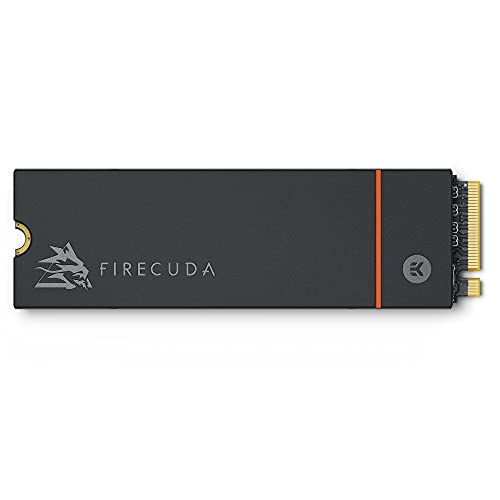 Seagate FireCuda 530 2TB with Heatsink | Check price on Amazon | |
 Crucial P3 Plus 2TB | Check price on Amazon | |
 Samsung 870 EVO 1TB | Check price on Amazon |
Key takeaways
- Find the best harddrive for gaming laptops with fast NVMe SSDs, roomy capacities and laptop-friendly fits for smoother loads and bigger game libraries.
Introduction
Finding the best harddrive for gaming laptops starts with a familiar frustration: the game library keeps growing, load screens keep getting longer, and the drive that came with the laptop is already full. Modern games can each take up tens of gigabytes, and a slow or cramped drive means more time waiting than playing. The right upgrade gives games room to breathe and cuts the pauses between launching a title and playing it.
A note on wording first. When most gamers say “harddrive” today, they mean the internal storage drive inside the laptop, and that is how this guide uses the term. The drives that make sense for a gaming laptop are solid state drives, or SSDs, so this article covers internal laptop storage drives: fast NVMe SSDs that slot into an M.2 bay, plus one SATA SSD for older laptops that still have a 2.5-inch drive bay. Every drive below is an internal drive designed to live inside a laptop, not an external USB drive.
This guide covers five drives for different gaming laptops and budgets, from a flagship Gen4 NVMe drive to a value Gen4 option and a SATA drive for older machines. Each one is listed on Amazon US, with its ASIN given so the exact model can be found, and the specifications below come from the manufacturers and published product listings. Before buying, check the laptop manual for the slot type and whether a second drive bay is available, because those details decide which drive will actually fit.
At a Glance
| Product | Best for | Key spec |
|---|---|---|
| Samsung 990 Pro 2TB | Maximum Gen4 speed | Up to 7,450 MB/s read, PCIe Gen4 NVMe, M.2 2280 |
| WD Black SN850X 2TB | High-end gaming with strong endurance | Up to 7,300 MB/s read, 1,200 TBW, 5-year warranty |
| Seagate FireCuda 530 2TB with Heatsink | Large libraries and data recovery cover | Up to 7,300 MB/s read, 3-year Rescue Services |
| Crucial P3 Plus 2TB | Value Gen4 upgrade | Up to 5,000 MB/s read, PCIe Gen4 NVMe, M.2 2280 |
| Samsung 870 EVO 1TB | Older laptops with a 2.5-inch bay | Up to 560 MB/s read, SATA III, 2.5-inch |
How to Choose a Hard Drive for a Gaming Laptop
Choosing the best harddrive for gaming laptops is mostly a matching exercise. The fastest drive is useless if it does not fit the slot, and a huge drive is wasted if the laptop cannot use its speed. Working through the factors below before ordering avoids the most common upgrade mistakes.
Check the slot and form factor first. Most modern gaming laptops use an M.2 2280 slot, which takes a stick-shaped drive 22 mm wide and 80 mm long. That is the form factor of four of the five drives in this guide, and some laptops have a second M.2 slot so the original drive can stay in place. Older laptops may instead have a 2.5-inch SATA bay, which is the only home for a drive like the Samsung 870 EVO below. A few thin laptops use the shorter M.2 2242 size, which none of these drives fit.
Match the interface to the laptop. An NVMe drive on a PCIe Gen4 link is the fastest option, with sequential reads above 7,000 MB/s on the flagship models here. A Gen3 laptop will still run a Gen4 drive, just at Gen3 speeds, so buying Gen4 is not wasted if a future laptop can use the full speed. A SATA drive tops out around 560 MB/s, far slower on paper, yet still a large step up from a spinning hard disk drive and the right choice when SATA is the only interface available.
Pick a capacity with the game library in mind. A 1TB drive holds a reasonable collection, but with individual games now regularly passing 100 GB, it fills up quickly. A 2TB drive is the sweet spot for most gaming laptops, holding the operating system, a dozen or more large games, and room for updates and new releases.
Look at endurance and warranty, not just speed. Endurance is rated in TBW, or terabytes written, and it describes how much data can be written to the drive over its life. Gaming involves a lot of writing through installs, updates, and recorded footage. The flagship drives in this guide carry ratings of 1,200 TBW at 2TB, which is generous for normal gaming use, and a five-year limited warranty is standard across the drives recommended here.
Think about heat and thickness. High-speed NVMe drives generate heat under sustained loads, and a gaming laptop has far less airflow than a desktop. Some laptops include a thermal pad or a thin heatsink over the M.2 slot, and that factory cooling should be kept in place. A drive sold with a tall factory heatsink, such as the heatsink version of the FireCuda 530 below, may not fit in a thin laptop at all, so the bare version of the same drive is the safer pick.
Remember the operating system and data. Replacing the only drive in a laptop means reinstalling the operating system or cloning the old drive onto the new one, and either way a backup of saves, documents, and game settings should be made first. Adding a second drive is simpler, since the original drive stays untouched.
The Best Hard Drives for Gaming Laptops
Samsung 990 Pro 2TB
The Samsung 990 Pro is the flagship pick in this guide, and its numbers explain why. This is a 2TB NVMe SSD on a PCIe Gen4 x4 interface in the M.2 2280 form factor, model MZ-V9P2T0B/AM, rated for sequential reads up to 7,450 MB/s and sequential writes up to 6,900 MB/s. Samsung builds the drive with its V-NAND TLC flash and a 2GB LPDDR4 cache on the 2TB model, and the endurance rating is 1,200 TBW under a five-year limited warranty.
For a gaming laptop with a Gen4 M.2 slot, this is the drive that removes storage as a bottleneck. The 2TB capacity is roomy enough for a serious game library, and the drive is a single-sided bare module without a factory heatsink, so it sits low enough to work with the laptop’s own thermal pad.
The limitations are the ones that come with any flagship. It needs a Gen4 slot to show its full speed, so on a Gen3-only laptop some of its performance headroom goes unused, although it still runs at the full speed of that older interface. It is also a premium drive, so gamers on a tight budget may prefer the Crucial option below.
Pros:
– Near-maximum PCIe Gen4 speeds at up to 7,450 MB/s read
– 2TB capacity suits large game libraries
– Strong 1,200 TBW endurance with a five-year warranty
– Bare M.2 2280 design fits laptops without heatsink clearance worries
Cons:
– Full speed needs a Gen4 slot
– Premium positioning compared with value Gen4 drives
WD Black SN850X 2TB
The WD Black SN850X is Western Digital’s gaming-focused flagship, and the 2TB model, WDS200T2X0E, is a strong rival to the Samsung 990 Pro. It is an M.2 2280 NVMe SSD on PCIe Gen4, rated for sequential reads up to 7,300 MB/s and sequential writes up to 6,600 MB/s according to the manufacturer’s data sheet, with random performance up to 1,200K read IOPS and 1,100K write IOPS. It uses TLC 3D NAND with a DRAM cache, and the 2TB model is rated at 1,200 TBW with a five-year limited warranty.
What sets the SN850X apart for gaming is its tuning. Western Digital offers a Game Mode 2.0 feature through its Dashboard software, designed to reduce latency during game loading. The underlying hardware suits a gaming laptop well: fast sequential reads for loading large game assets, strong random performance, and a DRAM cache that keeps performance steady during long installs.
One detail to watch is the model number. The SN850X is sold both bare and with a factory heatsink, and the ASIN given here is the bare 2TB model, WDS200T2X0E, which is the version that fits a laptop. The heatsink version, WDS200T2XHE, is taller at 8.90 mm and is aimed at desktop and console use, so it should not be ordered for a thin gaming laptop.
Pros:
– Flagship Gen4 speed at up to 7,300 MB/s read
– DRAM cache and strong random IOPS for game loading
– 1,200 TBW endurance with a five-year warranty
– Bare 2TB model is laptop-friendly at 2.38 mm high
Cons:
– Heatsink version of the same drive does not fit most laptops, so the model number matters
– Full speed needs a Gen4 slot
Seagate FireCuda 530 2TB with Heatsink
The Seagate FireCuda 530 is a gaming SSD with a useful extra that none of the other drives here offers: Seagate’s Rescue Data Recovery Services. The model covered here is the 2TB version with a factory heatsink, ZP2000GM3A023, listed on Amazon US under ASIN B0977K2C74. It is an M.2 2280 drive on PCIe Gen4 x4 with NVMe 1.4, built on 3D TLC NAND, and Seagate rates the 2TB model for sequential reads up to 7,300 MB/s and sequential writes up to 6,900 MB/s. The drive carries a five-year limited warranty and includes three years of Rescue Services, which covers data recovery attempts if the drive fails.
That recovery cover is a genuine point of difference for a gaming laptop, where the drive holds not only games but also saves, settings, screenshots, and recorded clips. Games can be re-downloaded, but a lost save file or a personal video project cannot, so having a manufacturer-backed recovery service attached to the drive adds real peace of mind.
The important caveat is the heatsink. This ASIN is the heatsink version, and its factory heatsink makes it taller than a bare M.2 drive, so it may not fit inside a gaming laptop at all. Check the clearance above the M.2 slot before ordering this exact model. If the heatsink version does not fit, the standard FireCuda 530 without a heatsink, model ZP2000GM3A013, is the same drive in a laptop-friendly form.
Pros:
– Fast Gen4 speeds at up to 7,300 MB/s read
– Three years of Rescue Data Recovery Services included
– Five-year limited warranty
– 2TB capacity suits large game libraries
Cons:
– The heatsink version in this listing may not fit thin gaming laptops
– Buyers should confirm clearance or choose the bare version instead
Crucial P3 Plus 2TB
The Crucial P3 Plus is the value pick in this guide, and it is the drive for gamers who want Gen4 speed without paying flagship money. The 2TB model, CT2000P3PSSD8, is a PCIe Gen4 NVMe SSD in the M.2 2280 form factor, rated for sequential reads up to 5,000 MB/s and sequential writes up to 4,200 MB/s. That is slower than the flagship drives above, but still roughly nine times the speed of a SATA SSD, so game loading and installation feel quick in everyday use.
It fits a gaming laptop well as a second drive for the game library. The 2TB capacity leaves plenty of room for large games, and the drive is a bare M.2 2280 module, so it fits a standard laptop slot, and it carries a limited five-year warranty.
There are trade-offs behind the lower speed. The P3 Plus uses QLC NAND and a DRAM-less design that relies on host memory buffer technology, which means very long sustained writes can slow down once the drive’s cache is full. For gaming, where the workload is mostly reading game files rather than writing huge amounts of data in one go, that limitation matters less than it would for heavy video editing.
Pros:
– Genuine Gen4 speed at up to 5,000 MB/s read
– 2TB of space for a large game library
– Bare M.2 2280 design fits standard laptop slots
– Five-year limited warranty
Cons:
– Slower than flagship Gen4 drives
– QLC NAND and DRAM-less design can slow during very long sustained writes
Samsung 870 EVO 1TB
The Samsung 870 EVO is the odd one out in this guide, and it is here for a good reason: not every gaming laptop has an M.2 slot. Older gaming laptops often have a 2.5-inch SATA bay instead, sometimes alongside an M.2 slot, and for those machines the 870 EVO is the right upgrade. This is a 1TB SATA III SSD in the 2.5-inch form factor, model MZ-77E1T0B/AM, rated for sequential reads up to 560 MB/s and sequential writes up to 530 MB/s. It carries a 600 TBW endurance rating and a five-year limited warranty.
Compared with the NVMe drives above, 560 MB/s looks modest, but the comparison that matters is against the spinning hard disk drive it replaces. A SATA SSD loads games and boots the operating system far faster than a mechanical drive, runs silently, and has no moving parts to worry about when the laptop is carried around. For an older gaming laptop held back by a slow mechanical drive, swapping in the 870 EVO is one of the most noticeable upgrades available.
The 870 EVO also works as a secondary drive in a laptop that has both an M.2 slot and a 2.5-inch bay, giving extra capacity for games that do not need NVMe speed. Its main limitation is the SATA interface: it cannot match NVMe speeds, and it is not an option at all for laptops without a 2.5-inch bay, which includes most thin modern gaming laptops. Check the laptop’s drive bays before ordering, and if the machine only has M.2 slots, choose one of the NVMe drives above instead.
Pros:
– The right upgrade for laptops with a 2.5-inch SATA bay
– Much faster and more durable than a spinning hard disk drive
– 600 TBW endurance with a five-year warranty
– Silent operation with no moving parts
Cons:
– SATA speeds are far below NVMe drives
– Does not fit laptops without a 2.5-inch bay
Which Drive Fits Your Gaming Laptop
The best harddrive for gaming laptops depends on the laptop first and the budget second. For a modern gaming laptop with a Gen4 M.2 slot, the Samsung 990 Pro 2TB is the top choice, with the WD Black SN850X 2TB a near-equal alternative on endurance and speed.
For gamers who value data recovery cover, the Seagate FireCuda 530 2TB is worth a close look, with one condition: confirm the heatsink version fits, or buy the bare version of the same drive instead. For a second drive or a budget-conscious upgrade, the Crucial P3 Plus 2TB gives genuine Gen4 speed and 2TB of space at a friendlier level of cost. For an older laptop with only a 2.5-inch bay, the Samsung 870 EVO 1TB is the clear answer. Whichever drive is chosen, confirm the slot type and the clearance, back up saves and important files, and keep the laptop’s own thermal pad over the M.2 slot where one is fitted.
Frequently Asked Questions
What size hard drive is best for a gaming laptop?
For most gamers, 2TB is the best starting point. It holds the operating system plus a large library of modern games, with room for updates and new releases. A 1TB drive works for a smaller library or as a second drive, but it fills up quickly when individual games pass 100 GB.
Can I put a Gen4 NVMe SSD in a Gen3 gaming laptop?
Yes. A Gen4 NVMe drive works in a Gen3 M.2 slot and runs at Gen3 speeds, which top out around 3,500 MB/s. The drive is not damaged by the slower slot, and it can be moved to a Gen4 laptop later to use its full speed.
Is an SSD better than a hard disk drive for gaming?
Yes. An SSD loads games faster, boots the system faster, runs silently, and has no moving parts. A spinning hard disk drive is slower in every way that affects gaming, and it is best avoided as the main drive in a gaming laptop.
Will a new hard drive improve gaming frame rates?
A faster drive mainly improves loading times, level streaming, and how quickly games install, rather than the frame rate during gameplay. Frame rates depend mostly on the graphics card and processor, but a slow drive can cause stuttering when a game streams in new areas, so a good SSD still helps the overall experience feel smoother.
Conclusion
The best harddrive for gaming laptops is an internal SSD that matches the laptop’s slot, offers enough capacity for a growing game library, and carries the endurance to last for years. The Samsung 990 Pro 2TB leads on speed, the WD Black SN850X 2TB matches it on endurance, the Seagate FireCuda 530 2TB adds data recovery cover, the Crucial P3 Plus 2TB delivers Gen4 speed at a friendlier level of cost, and the Samsung 870 EVO 1TB keeps older laptops with a 2.5-inch bay in the game.
Disclosure: As an Amazon Associate, we earn from qualifying purchases.