Key takeaways
- Compare the best online double-conversion rackmount UPS units for network racks: true sine wave, zero transfer time, network cards and battery expansion.
As an Amazon Associate we earn from qualifying purchases
A network rack is only as reliable as the power feeding it. Switches, routers, firewalls and the servers behind them do not just need backup minutes when the utility fails; they need clean, tightly regulated power the rest of the time too, because sags, surges and frequency drift are what corrupt file systems and lock up network gear in the first place. That is exactly the job an online UPS is built for. This guide covers the best online computer UPSs for network racks in the true double-conversion sense of the word: rackmount units that continuously convert incoming AC to DC and back to a fresh sine wave, so the load never touches raw utility power. Below you will find what separates an online unit from a line-interactive one, how to size and fit one into a rack, and two verified picks from APC and CyberPower that cover the most common network rack loads.
Quick Picks: Online UPS Units for Network Racks
| Product | Best for | Key spec |
|---|---|---|
| APC Smart-UPS On-Line SRT1500RMXLA | Mixed server and network racks | 1500VA / 1350W, 2U, 6 outlets, SmartSlot |
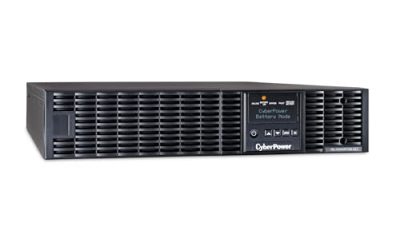
| CyberPower OL1000RTXL2U | Switch-heavy network racks on a tighter equipment budget | 1000VA / 900W, 2U, 8 outlets, SNMP slot |
Both units are online double-conversion designs with pure sine wave output and zero transfer time. Neither is a line-interactive model with an online-sounding name, and both mount in a standard 19-inch rack in 2U of space.
How to Choose an Online UPS for a Network Rack
Confirm the topology is really double-conversion
Online, in UPS terminology, means double-conversion: the rectifier turns incoming AC into DC, the battery sits on that DC bus, and the inverter continuously regenerates AC for the load. Because the inverter is always supplying the output, there is no transfer event when the utility drops out, which is why online units quote a transfer time of zero milliseconds. Line-interactive units, by contrast, pass utility power straight through and switch to battery in a few milliseconds when it fails. That brief gap is fine for a desktop, but for a rack of switches and storage it also means every sag and spike on the utility line reaches your equipment unfiltered. If a product page does not use the words double-conversion or on-line topology, it is not the class of UPS covered here.
Size in watts, not just VA
UPS ratings carry two numbers: volt-amps (VA) and watts (W). The ratio between them is the output power factor. A 1500VA unit with a 0.9 power factor delivers 1350W of real power; an older design with a 0.7 factor would deliver barely over 1000W from the same headline VA. Modern servers and switches with active power factor correction draw close to their watt rating, so plan around watts. Add up the actual draw of everything in the rack, which is usually well below the sum of the power supply nameplates, then leave headroom of roughly 20 to 30 percent so the UPS is not running at its limit and so a future switch or server does not push it into overload.
Check rack units, depth and weight before anything else
Both picks here are 2U rack/tower convertibles, which is the standard footprint for this class. Depth is the dimension that catches people out. Online units are deep because the inverter, transformer components and battery pack all live in the same chassis; the APC below is 508 mm (20 inches) deep before you add cable bend radius at the back. Measure your cabinet from the front rail to the rear door, allow room for power cords and airflow, and confirm the rack can take the weight: a 2U online UPS with lead-acid batteries typically lands between about 18 and 22 kg, which matters for wall-mount cabinets and two-post racks.
Insist on pure sine wave output and zero transfer time
Every genuine double-conversion UPS produces a pure sine wave, because the inverter synthesises the output waveform full-time. That matters for active PFC power supplies in servers and high-end switches, which can behave unpredictably on simulated sine wave power. Zero transfer time is the other half of the same design: since the inverter never stops supplying the load, an outage is a non-event for the equipment. If a listing advertises a transfer time in milliseconds, the unit is switching to battery, which means it is not a true online design.
Decide how the UPS will be managed
A rack UPS that nobody monitors is a battery waiting to fail quietly. At minimum, look for USB or serial shutdown signalling so a connected server can save its work and shut down cleanly during a long outage. For a network rack, a network management card is the better answer: it gives the UPS its own IP address, sends alerts, logs power events and lets you reboot locked-up equipment by cycling an outlet from a browser. The APC uses its SmartSlot for an optional Network Management Card, and the CyberPower has an SNMP slot that takes its RMCARD205 card; a pre-configured variant of the CyberPower ships with that card already installed. Budget for the card if remote racks are part of the picture.
Plan runtime with external battery packs
Internal batteries in a 2U online UPS typically give a few minutes at full load and longer at partial load, which is enough for a generator to start or for an orderly shutdown, not for riding out a long outage. When the rack has to stay up, look for an extended runtime model with a connector for external battery packs. Both picks below support add-on battery modules: APC rates its SRT line for extended runtime with matching rackmount battery packs, and CyberPower offers extended battery modules for the OL series. Each added pack costs rack space and weight, so decide the runtime target first and then count the units.
Match outlets and the input plug to your rack
Outlet count and type decide how much of the rack can plug straight in and how much needs a rack PDU behind the UPS. The two picks differ here: the APC provides six NEMA 5-15R outlets, while the CyberPower provides eight. Input plugs matter just as much. Both of these units use a standard NEMA 5-15P plug on a 15-amp circuit, which suits most network closets. Larger online models step up to 20-amp or 30-amp plugs, so check the receptacle in your rack before ordering a bigger unit than these.
Expect heat, fan noise and lower efficiency
Double-conversion is not free. Because the rectifier and inverter run continuously, an online UPS converts a slice of the power it handles into heat, and its fans run accordingly. Efficiency in online mode is typically in the high eighties to low nineties percent, and both makers offer an eco or green bypass mode that trades a small amount of protection for efficiency above 95 percent. Put an online UPS in a ventilated equipment room rather than a quiet office, and make sure the rack’s cooling plan accounts for the extra heat load.
The Picks in Detail
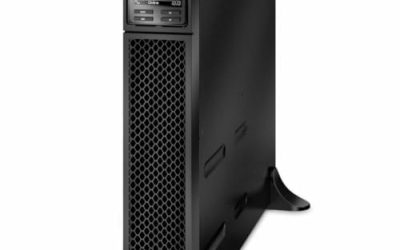
APC Smart-UPS On-Line SRT1500RMXLA

The SRT1500RMXLA is APC’s 1500VA entry in the Smart-UPS On-Line SRT family, and it is the natural default for a rack that mixes network gear with one or two servers. It delivers 1350W of double-conversion power with a pure sine wave output, holds output frequency at 50/60 Hz within plus or minus 3 Hz when synchronised to mains, and runs from a standard 120V circuit through a NEMA 5-15P plug. Six NEMA 5-15R outlets cover the core devices, and the chassis converts between 2U rackmount with the included rail kit and a tower stance for a rack that has not arrived yet. A multi-function LCD gives load, battery and runtime status at the front panel, the SmartSlot accepts APC’s Network Management Card for remote monitoring and outlet control, and a SmartConnect port adds basic cloud monitoring. Runtime is extendable with external SRT battery packs, and the internal battery is a single replaceable cartridge (APCRBC155) with a typical recharge time of three hours.
- Strength: Full-featured management for an online unit at this size, with a SmartSlot for a network card, an LCD that reports real load and battery health, and a mature external battery pack ecosystem for longer runtime.
- Trade-off: Six outlets is the fewest in this class, so a fuller rack will need a PDU behind it, and at 508 mm deep and 22 kg it is one of the larger 2U chassis here; shallow wall cabinets are out.
Skip it if your rack is shallow or wall-mounted, or if your total load is only a few switches and a router, where the smaller CyberPower below covers the job in the same 2U footprint.
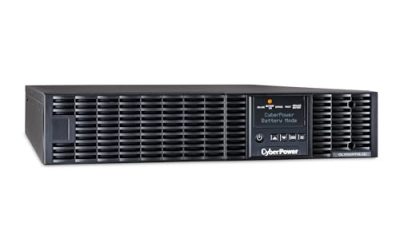
CyberPower OL1000RTXL2U

The OL1000RTXL2U is the 1000VA model in CyberPower’s Smart App Online series, a double-conversion line built specifically for servers, network and storage devices and VoIP installations. It supplies 900W at a 0.9 power factor with a pure sine wave output and zero transfer time, and it feeds eight NEMA 5-15R outlets from a NEMA 5-15P input on a 10-foot cord, which helps when the rack’s receptacle is not directly behind the unit. The 2U chassis converts between rack and tower use. Management is broad for the class: USB and serial ports, an EPO connection, relay contacts, and an expansion slot for the optional RMCARD205 SNMP card, with PowerPanel Business Edition software included for monitoring and unattended shutdown. The GreenPower UPS ECO mode lifts efficiency above 95 percent when full double-conversion is not required, Smart Battery Management charging is designed to extend battery life, and extended battery modules can be added when the internal pack’s runtime is not enough. CyberPower backs the unit with a three-year warranty.
- Strength: Eight outlets and a full management port set, including an SNMP slot and EPO, in a 1000VA online unit; the long input cord and ECO mode are practical touches for small network rooms.
- Trade-off: At 900W it is the smaller ceiling of the two picks, so a rack with a hungry storage array or several servers will outgrow it; the network card is an add-on unless you choose the variant that ships with it fitted.
Skip it if your measured rack load is already close to 900W, or if you expect to add servers soon; step up to the APC above for the extra wattage and the deeper battery expansion options.
Which One Fits Your Situation
A switch, router and firewall rack in a small office
This is the CyberPower’s home ground. A stack of access switches, a router and a firewall usually draws a few hundred watts, well inside 900W, and the eight outlets let every device plug in directly without a separate PDU. The online topology earns its keep here because small-office power is often the dirtiest, and the switches stay up through sags that would otherwise reboot them.
A mixed rack with servers and storage
Choose the APC SRT1500RMXLA. The 1350W ceiling covers a couple of servers alongside the network gear, the network card option gives you alerting and remote outlet control, and the external battery pack path lets you stretch runtime for the storage array without replacing the UPS itself.
An unmanned branch or wiring closet
Either unit works electrically; the decision is the management card. Fit the APC with its Network Management Card or choose the CyberPower variant with the RMCARD205 pre-installed, so the UPS can report a failing battery or a power event before the site goes dark, and so you can power-cycle a hung switch without a site visit.
A site with a standby generator
Online double-conversion is the safest partner for generator power, because the inverter output stays clean and stable while generator frequency wanders during start-up and load changes. Both picks are generator-friendly in this sense; size the UPS for the minutes the generator needs to start and stabilise, rather than for the whole outage.
Common Mistakes
- Buying a line-interactive UPS because the listing says online in the marketing copy, then discovering the transfer time is several milliseconds and utility noise passes straight through.
- Sizing by VA alone and overloading the unit, because the watt rating, set by the power factor, is the number the load actually has to fit inside.
- Forgetting to measure rack depth, then finding a 20-inch-deep UPS cannot close inside a shallow wall cabinet once the cords are attached.
- Skipping the network management card on a remote rack, leaving no way to receive battery warnings or reboot equipment without travelling to site.
- Expecting internal batteries to carry a long outage; a 2U online UPS is a bridge to a generator or a clean shutdown unless external battery packs are fitted.
- Plugging a laser printer or other high-surge device into the battery outlets, which can overload the inverter the moment it cycles.
- Ignoring heat and fan noise, then placing an always-converting online UPS in a small unventilated closet or a quiet office.
FAQ
What makes an online UPS different from a line-interactive UPS?
An online UPS uses double-conversion: incoming AC is converted to DC and then back to AC by an inverter that runs continuously, so the load is fully isolated from utility noise and there is zero transfer time when power fails. A line-interactive UPS passes utility power through and only switches to battery, with a small delay, when the power goes out of tolerance.
How much runtime does a rackmount online UPS provide?
With internal batteries only, expect a few minutes at full load and longer at partial load; the APC above is rated around five minutes at full load, with a three-hour typical recharge. That is enough for a generator start or a controlled shutdown. For longer runtime, both picks accept external battery packs that add minutes in exchange for extra rack units.
Do I need a network management card for a network rack UPS?
For a rack in the same room as the people who maintain it, USB shutdown signalling may be enough. For anything remote, yes: a network card gives the UPS its own presence on the network for alerts, event logs and remote outlet control, which is how you learn a battery is failing before an outage turns it into downtime.
Will an online UPS work with a generator?
Yes, and it is usually the best topology for generator sites. Because the output is regenerated by the inverter, fluctuations in generator frequency and voltage are absorbed by the conversion stage instead of reaching the rack. Just confirm the UPS input frequency window accepts your generator’s output range.
How do I work out what size online UPS my rack needs?
Add up the real watt draw of the equipment, using a plug-in meter or the figures from your managed PDU rather than power supply nameplates, then choose a UPS whose watt rating exceeds that figure with roughly a quarter to spare. Both picks here sit on ordinary 15-amp circuits, which keeps the install simple for network closets.