Key takeaways
- Compare wide-format thermal-transfer printers for growing online stores, covering 4-inch shipping labels and wider carton and pallet labels that last.
As an Amazon Associate we earn from qualifying purchases.
Disclosure: This article contains affiliate links. If you buy through a link on this page, we may earn a commission at no extra cost to you.
A growing online store outgrows a basic shipping label printer faster than most owners expect. At first, one 4 x 6 inch shipping label at a time is enough. Then orders are packed in more box sizes, and the same printer must also produce product, carton, compliance, return, and pallet labels. Labels that fade, smudge, or peel start causing rescans, returns, and support messages.
That is where wide-format thermal-transfer printers earn their place. Thermal transfer uses a heated printhead to melt ink from a ribbon onto the label face, giving a more durable image than direct thermal alone, especially on synthetic and coated stocks that must survive handling, moisture, and storage. Wide-format models add print width, from the 4-inch class up to 6-inch machines, so a store can print a shipping label today and a larger carton or pallet label tomorrow on one device.
This guide focuses only on true thermal-transfer models with a print width of about 4 inches or more, as listed in their specifications. Every pick also offers direct thermal as a secondary mode, which is normal for this class, but none is a direct-thermal-only, inkjet, or laser printer. The four picks cover a proven 4-inch workhorse, a genuinely wider 6-inch model, a lighter industrial step-up, and a fast 4-inch alternative.
Quick picks
- Best all-round 4-inch industrial pick: Zebra ZT411, 203 dpi configuration — 4.09-inch print width, fast output, a colour touch display, and broad wired and wireless connectivity for a busy dispatch area.
- Best truly wide format: Zebra ZT421, 203 dpi configuration — 6.6-inch print width for oversized carton, compliance, and pallet labels that will not fit a 4-inch printer.
- Best first industrial step up: Zebra ZT231 — 4-inch thermal-transfer printing in a smaller industrial frame, suited to stores moving beyond a desktop unit for the first time.
- Best for speed on 4-inch labels: SATO CL4NX Plus, 203 dpi configuration — 4.1-inch print width, very fast listed print speed, and LAN, USB, serial, and Bluetooth connectivity with a real-time clock.
Use the quick picks to shortlist, then read the full sections before you buy. With industrial printers, the exact configuration matters as much as the model name. Resolution, interfaces, and media handling options vary by configuration, so always match the listing details to the job you actually run.
Why thermal transfer matters for an online store
Direct thermal labels need no ribbon, but their image sits in a heat-sensitive coating. Heat, sunlight, and abrasion can shorten their life. That is acceptable for a shipping label that only needs a few days in transit, but poor for a product label in storage, a repeatedly handled carton label, or an identifier that must stay scannable for months.
Thermal transfer separates the image from that coating. Wax, wax-resin, and resin ribbons let you match durability to the stock, from everyday paper to synthetic faces that resist moisture and rubbing. You keep one printer and change ribbon and media as your range changes.
Width matters too. A 4-inch printer covers standard shipping and most product and carton labels. A 6-inch printer adds room for larger compliance formats, combined information on one label, and pallet labelling without shrinking type. Buying too wide wastes space and stock money; buying too narrow is costly if a carrier or warehouse workflow soon demands a larger format.
1. Zebra ZT411 — the proven 4-inch industrial workhorse
The Zebra ZT411 in its 203 dpi configuration is the safest starting point for most growing stores that print all day, every day. Its listing describes a thermal-transfer industrial printer with a 4-inch print width, more precisely 4.09 inches, with serial, USB, Ethernet, and Bluetooth connectivity. That combination covers the core needs of a packing bench: a network connection for shared use, USB for a single workstation, and a print width that matches the shipping labels most carriers and marketplaces expect.
In daily use, the ZT411 suits a store that has moved past occasional batches. Orders can be printed in runs, carton labels follow the same workflow, and product labels can be run on thermal-transfer stock when they need to last in storage. The 4.3-inch colour touch display listed for this family helps staff change settings and clear routine issues at the printer, reducing stoppages during a dispatch peak.
Specifications
- Print method: Thermal transfer and direct thermal
- Resolution in this configuration: 203 dpi
- Maximum print width: 4.09 inches
- Print width class: 4 inches
- Connectivity in this listing: Serial, USB, Ethernet, and Bluetooth
- Display: 4.3-inch colour touch display
- Model reference in the listing: ZT41142-T010000Z family, 203 dpi configuration
Check the listing carefully if you need 300 dpi instead. The ZT411 family is also sold in other resolutions, and a listing for one resolution should never be assumed to describe another. For standard shipping barcodes and address labels, 203 dpi is the common choice. For smaller type or denser codes on product labels, a higher-resolution configuration may be the better fit.
Pros
- True thermal-transfer printing for longer-lasting labels on suitable media
- 4.09-inch width covers standard shipping labels and most carton labels
- Ethernet for shared network use, plus USB, serial, and Bluetooth in the listing
- Colour touch display makes routine setup and troubleshooting faster at the bench
- Industrial build intended for sustained daily throughput
Cons
- Still limited to the 4-inch class, so oversized pallet formats need a wider model
- Configuration choice matters, and buyers must confirm resolution before ordering
- Larger and heavier than a desktop label printer, so it needs dedicated bench space
View the Zebra ZT411 on Amazon
2. Zebra ZT421 — the genuinely wide 6-inch option
The Zebra ZT421 is the pick for stores whose labels have genuinely outgrown 4 inches. The listing for this configuration describes a 6-inch thermal industrial printer at 203 dpi, model ZT42162-T010000Z, with USB, serial, Ethernet, and Bluetooth 4.1, MFi, and a touch colour LCD, and it lists thermal transfer as the printer ink type. Zebra describes the ZT421 print width as up to 6.6 inches, which puts it in a different category from the other picks here. That extra width is not a cosmetic upgrade. It changes what fits on one label.
With a ZT421, a store can print wider carton and pallet labels, larger compliance information, and combined labels carrying shipping, contents, and handling data together. That helps when products ship in mixed sizes, when a warehouse team wants one large readable label instead of several small ones, or when a logistics partner specifies a wider format.
The trade-offs are footprint and stock. A 6-inch printer takes more space, and wide media and ribbons are a separate stock line from 4-inch supplies. If almost every label is a standard 4 x 6, the ZT411 is the simpler choice. If wide labels are already a weekly reality, the ZT421 is the honest fit.
Specifications
- Print method: Thermal transfer, with direct thermal also supported in the series
- Resolution in this configuration: 203 dpi
- Maximum print width: 6.6 inches
- Media size in the listing: Up to 6.6 inches, listed as a 6-inch class printer
- Connectivity in this listing: USB, serial, Ethernet, and Bluetooth 4.1, MFi
- Display: Touch colour LCD
- Model reference in the listing: ZT42162-T010000Z
Pros
- Widest print width in this guide, for carton, compliance, and pallet labels
- True thermal-transfer output for durable, scannable wide labels
- Network, USB, serial, and Bluetooth connectivity for shared industrial use
- Same ZT400 family operating style as the ZT411, which eases training if you run both
- Gives a growing store real format headroom instead of a near-term replacement cycle
Cons
- Largest footprint in this guide and needs planned space and media storage
- Wide ribbons and media are an additional stock line to manage
- More printer than a store printing only standard shipping labels will use
View the Zebra ZT421 on Amazon
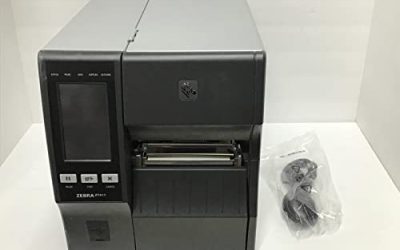
3. Zebra ZT231 — the first industrial step up
The Zebra ZT231 is aimed at the point where a desktop label printer stops keeping up but a store does not yet need the heaviest industrial machine. Listings describe the ZT231 as a 4-inch thermal-transfer industrial printer and as the replacement line for the earlier ZT230, with thermal transfer and direct thermal printing. That positioning matters for online stores. It is a step into an industrial frame, larger ribbon handling, and networked daily use, without jumping straight to the largest models in a range.
For a growing store, the ZT231 fits a dedicated packing bench or small dispatch corner. It handles shipping labels, product labels on thermal-transfer stock, bin and shelf labels, and 4-inch carton labels. Reseller material highlights speeds up to 12 inches per second at 203 dpi and connectivity including USB, serial, Ethernet, Bluetooth Low Energy, and USB Host. Treat those as family-level claims and confirm the exact interfaces on the listing you buy.
Choose the ZT231 if your problem is reliability and throughput on standard-width labels. Choose the ZT411 if you expect heavier sustained volume. Both are 4-inch class machines; the distinction is how hard the printer will work each day.
Specifications
- Print method: Thermal transfer and direct thermal
- Resolution: 203 dpi in the commonly listed configuration, with other configurations in the family
- Maximum print width: 4 inches, in the 4.09-inch class
- Connectivity to confirm on the chosen listing: USB, serial, Ethernet, and Bluetooth options in the family
- Intended class: Light industrial, as the successor line to the ZT230
- Typical use: Shipping, product, carton, bin, and shelf labels at standard width
Pros
- Industrial thermal-transfer printing in a more approachable step-up model
- Standard 4-inch width matches the labels most online stores already use
- Suited to a first dedicated packing bench or small dispatch area
- Family positioning as the ZT230 replacement gives a current, supported direction
- Works for both short-life shipping labels and longer-life transfer labels
Cons
- No extra width beyond the 4-inch class
- Exact speed and interfaces vary by configuration, so the listing must be checked line by line
- Stores with very heavy all-day volume may outgrow it sooner than a ZT411
View the Zebra ZT231 on Amazon
4. SATO CL4NX Plus — fast 4-inch printing with a real-time clock
The SATO CL4NX Plus, 203 dpi configuration, is the alternative for stores that value speed and operational features on standard-width labels. Its Amazon listing describes it directly as a 203 dpi, 4.1-inch thermal-transfer printer with LAN, USB, serial, and Bluetooth, with a real-time clock. That title alone separates it from direct-thermal-only machines. It uses ribbon, it prints just over 4 inches wide, and it connects to a network as a shared industrial resource.
SATO lists the CL4NX Plus family with speeds up to 14 inches per second at 203 dpi in family material. The relevant configuration here is the 203 dpi listing above, so do not transfer a figure from a different variant to your purchase without checking. In the right configuration, it suits long runs of product, carton, and dispatch labels.
The real-time clock has practical value: date and time can be printed in a label format for packing dates, batch handling, and internal tracking. Combined with LAN connectivity, that suits a more structured operation where labels carry operational data as well as an address or barcode.
Specifications
- Print method: Thermal transfer, with direct thermal also supported in the family
- Resolution in this configuration: 203 dpi
- Maximum print width in the listing: 4.1 inches
- Connectivity in the listing: LAN, USB, serial, and Bluetooth
- Clock: Real-time clock included in this listing
- Print media in the listing: Labels
- Model: CL4NX Plus
Pros
- Clearly listed as a thermal-transfer printer using ribbon
- 4.1-inch width covers standard shipping and product label formats
- LAN, USB, serial, and Bluetooth give flexible placement and sharing
- Real-time clock supports date and batch information in label formats
- Fast family positioning suits long runs and busy dispatch periods
Cons
- No wider format than the 4-inch class
- Family variants differ in resolution and options, so configuration checks are essential
- Less familiar to teams whose existing fleet and software are built entirely around another brand
View the SATO CL4NX Plus on Amazon
How to choose the right model for your store
Start with the widest label you must print, not the label you print most often. If that widest job is a standard shipping label, stay in the 4-inch class and choose on throughput, connectivity, and durability. If that widest job is a pallet, oversized carton, or combined compliance label, only the ZT421 in this guide has the width for it. Everything else follows from that single measurement, including the media and ribbon sizes you will stock.
Next, match resolution to your smallest label content. Shipping barcodes and address text work well at 203 dpi, which is why every configuration here uses it. Small product labels and fine text can benefit from a 300 dpi configuration, but that is a different listing. Read the resolution in the exact listing title and specification table.
Then decide on connectivity. Ethernet is the practical choice for a shared packing area. USB suits a single bench. Bluetooth helps with placement, but should not be the only plan for a high-volume shared printer. If several staff will load media and clear errors, a clear colour display is worth prioritising.
Consider ribbon logistics too. Wax is common for everyday paper labels, wax-resin adds durability, and resin suits demanding synthetic applications. Printer and media specifications should agree on ribbon width, core size, and winding direction. Running out of the correct ribbon stops printing just as surely as running out of labels.
Finally, measure where the printer will live. Industrial models need stable bench space, room to open the cover and load rolls, and nearby storage for media and ribbons, especially the larger ZT421.
Frequently asked questions
Is thermal transfer better than direct thermal for shipping labels?
For a shipping label that only needs to survive transit, either method can work. Thermal transfer becomes the better choice when labels must last longer, resist rubbing and moisture, or be printed on synthetic or coated stock. Many growing stores choose thermal transfer because the same printer also handles product, carton, and storage labels with longer lives.
Do I need a 6-inch printer if I mostly print 4 x 6 labels?
No. If almost all of your work is standard 4 x 6 shipping labels, a 4-inch class model such as the ZT411, ZT231, or CL4NX Plus matches that job. A 6-inch model such as the ZT421 makes sense when you regularly print wider carton, compliance, or pallet labels, or when a partner specifically requires a wider format.
Can these printers also print direct thermal labels?
Yes, the models in this guide support direct thermal as well as thermal transfer, which is typical for industrial printers in this class. That gives you flexibility for short-life labels. The reason they are included here is their thermal-transfer capability with ribbon, not the direct thermal mode alone.
What ribbon should a growing store start with?
Start with the ribbon type your label stock requires. For standard paper product and carton labels, that is often a wax or wax-resin ribbon. For synthetic labels or harsher handling, a wax-resin or resin ribbon may be required. Confirm ribbon width, length, core size, and compatibility in the printer and media specifications before ordering in quantity.
Why does the exact configuration matter so much?
Industrial printers are sold as families with different resolutions, interfaces, displays, and media handling options. Two listings with the same model name can differ in ways that affect your workflow. Check resolution, print width, connectivity, and included options on the exact listing, and keep that listing information with your purchase records.
Conclusion
For most growing online stores, the Zebra ZT411 is the balanced choice: true thermal-transfer printing, a standard 4.09-inch width, network connectivity, and an industrial build for daily dispatch. If your labels have already grown beyond 4 inches, the Zebra ZT421 is the clear step up, with up to 6.6 inches of print width for carton and pallet work. The Zebra ZT231 suits a store making its first move to a dedicated industrial bench printer at standard width, while the SATO CL4NX Plus offers a fast 4.1-inch alternative with LAN, Bluetooth, and a real-time clock.
Whichever model you choose, decide on width first, confirm the exact configuration second, and plan ribbon and media supply before it arrives. That prevents the common mistake of buying a capable printer in the wrong width or resolution.