Our Short List of 3
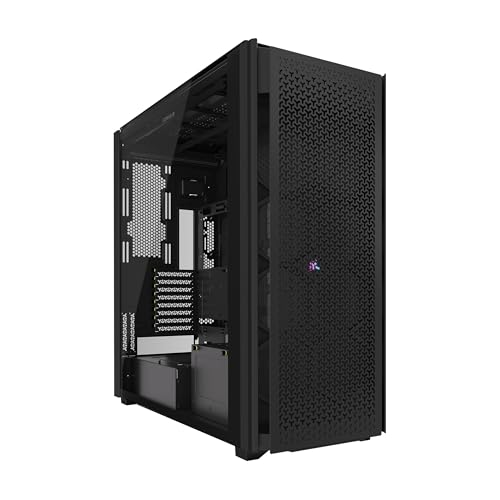
- Best for: Extreme air- or water-cooled builds where maximum fan and radiator room is the priority.
- Case type: Super Full-Tower PC Case
- Fan capacity: Fits up to 18x 120mm, 7x 140mm, or 4x 200mm fans
- Fan mounting: InfiniRail fan mounting system
- Included hub: iCUE Link System Hub included

- Best for: Water-cooled showpiece builds where glass panels and large radiator support matter most.
- Motherboard support: Up to 280mm E-ATX motherboard
- Radiator support: Up to 3x 420mm radiator
- Panels: Front and side tempered glass panels
- Lighting: ARGB lighting strips

- Best for: Builders who want a flexible interior and vertical GPU mounting in a full tower.
- Case type: E-ATX Full-Tower
- Side panel: Curved tempered glass panel
- Included accessory: Riser cable for vertical GPU mounting
- Interior: Flexible interior layout
All 4 Picks at a Glance
| Product | Specs | Action |
|---|---|---|
| Corsair 9000D RGB Airflow |
| Check price on Amazon |
| Lian Li O11 Dynamic EVO XL |
| Check price on Amazon |
| Cooler Master Cosmos C700M |
| Check price on Amazon |
 Corsair Obsidian 750D Airflow Edition |
| Check price on Amazon |
Key takeaways
- Compare four ATX full tower PC cases by radiator support, fan capacity, and build room, and find the right full-size chassis for a big air or water-cooled build.
The real decision when buying an ATX full tower case is not whether it looks impressive on a desk, but whether the hardware you plan to install actually fits inside it with room to breathe. A long graphics card, a thick radiator, an E-ATX board, and a stack of drives all compete for the same space, and a case that is merely tall can still be too short for a top-mounted radiator or too narrow for a wide air cooler. Full towers exist to remove those limits, so the choice comes down to cooling support, layout, and the size of the build.
This article is for builders planning a high-end gaming rig, a workstation with several drives and a large cooler, or a custom water-cooled system that a mid-tower cannot hold. It compares four full-tower ATX cases sold on Amazon, from a super-sized chassis built for extreme cooling to a classic airflow tower, and explains how to check fit before ordering.
Quick Picks
As an Amazon Associate we earn from qualifying purchases.
| Product | Best for | Key spec from title |
|---|---|---|
| Corsair 9000D RGB Airflow | Extreme cooling with many fans and radiators | Super full-tower PC case |
| Lian Li O11 Dynamic EVO XL | Showpiece water-cooled builds with glass panels | Full tower gaming case |
| Cooler Master Cosmos C700M | Flexible layouts and vertical GPU mounting | E-ATX full-tower case |
| Corsair Obsidian 750D Airflow | Simple high-airflow builds on a classic layout | Full-tower case, Airflow Edition |
How to Choose
Check Motherboard, GPU, and Cooler Clearance First
Full tower does not automatically mean everything fits, so check the numbers before buying. Start with the motherboard: standard ATX boards fit every case here, but E-ATX boards are wider, so confirm the maximum board width in the case specs. Next, measure the graphics card against the maximum GPU length, and remember that a front-mounted radiator can steal length from that figure. Check CPU cooler height for tall air coolers, and note how many radiators fit and where they mount. Write the four numbers down for your parts and compare them with the case listing before ordering.
Airflow Beats Looks
A full tower holds a lot of warm air, so the front panel and fan layout matter more than the glass. Mesh front panels let cool air in freely, while solid glass fronts look striking but force air through narrow side gaps. Neither is wrong, but they suit different builds: a hot graphics card and processor in a glass-fronted case need more fans and a careful fan curve to stay cool. Count the fan mounts and check which fans are included, because a case that ships with no fans costs more once you add them. Note the maximum fan sizes: 140mm and 200mm fans move more air at lower speeds than 120mm fans, which keeps a big build quieter.
Radiator and Water-Cooling Support
Water cooling is the main reason many builders choose a full tower, so radiator support deserves its own check. Look for the number of radiator positions and the largest size each one takes, such as 360mm or 420mm, and whether the case fits thick radiators with push-pull fans. A chassis that holds three 420mm radiators can cool a processor and graphics card on separate loops, while one that holds a single 360mm radiator is a tighter fit for a dual-component loop. Also check pump and reservoir mounting, because a full tower without a dedicated spot leaves the builder improvising brackets. Measure the distance between radiator mounts and the graphics card before buying fittings.
Storage, Cable Space, and Build Quality
A full tower should make a big build easier, not just bigger. Check the drive mounts: some builders still need several hard drives for media, while others only need two solid-state drives and would rather have the space for a radiator. Note whether drive cages are removable, since a fixed cage can block a long power supply or a front radiator. Cable space behind the motherboard tray matters, because thick power cables and fan hubs need room. Check the front panel connections, including USB-C and audio, since a case kept for years should match the motherboard’s ports. Finally, measure the desk space the case will occupy, because a super full tower can be nearly 28 inches tall and deep.
The 4 Best Options
Corsair 9000D RGB Airflow
- Best for: Extreme air- or water-cooled builds where maximum fan and radiator room is the priority.
- Case type: Super Full-Tower PC Case
- Fan capacity: Fits up to 18x 120mm, 7x 140mm, or 4x 200mm fans
- Fan mounting: InfiniRail fan mounting system
- Included hub: iCUE Link System Hub included
Extreme air- or water-cooled builds where maximum fan and radiator room is the priority.
It ships with no fans, so budget for them separately, and measure the desk or floor first, since it is far larger than a standard full tower.
The 9000D is the largest case in this article, built for builders who want extreme cooling capacity above all else. Its fan capacity is far beyond a normal full tower, with room for up to eighteen 120mm fans, seven 140mm fans, or four 200mm fans, and its InfiniRail mounting system lets fan and radiator positions slide to where they are needed. An iCUE Link System Hub is included for connecting compatible fans and lighting, though no fans are included in the box. At nearly 28 inches in each direction, it is a chassis for a dedicated build space rather than a small desk.
Lian Li O11 Dynamic EVO XL
- Best for: Water-cooled showpiece builds where glass panels and large radiator support matter most.
- Motherboard support: Up to 280mm E-ATX motherboard
- Radiator support: Up to 3x 420mm radiator
- Panels: Front and side tempered glass panels
- Lighting: ARGB lighting strips
Water-cooled showpiece builds where glass panels and large radiator support matter most.
Glass panels and a 43-pound empty weight make it heavy to move, and the display-first design needs enough fans added to keep airflow strong.
The O11 Dynamic EVO XL is the showpiece pick, built around front and side tempered glass panels that display the whole build, with addressable RGB lighting strips along the chassis. It supports motherboards up to 280mm E-ATX in width and radiators up to three 420mm units, which covers a processor and graphics card loop with room to spare. The chassis is reversible, so the build can be mirrored to suit the desk, and cable management is handled by a separate rear compartment. It is a heavy case at 43 pounds empty, which reflects the glass and steel in its construction.
Cooler Master Cosmos C700M
- Best for: Builders who want a flexible interior and vertical GPU mounting in a full tower.
- Case type: E-ATX Full-Tower
- Side panel: Curved tempered glass panel
- Included accessory: Riser cable for vertical GPU mounting
- Interior: Flexible interior layout
Builders who want a flexible interior and vertical GPU mounting in a full tower.
The flexible layout takes more planning than a fixed one, so read the manual and plan the radiator and GPU positions before the first fitting.
The Cosmos C700M is the flexible pick, with an interior layout that can be rearranged to suit the build rather than forcing the build to fit the case. Its curved tempered glass side panel shows the hardware, and a riser cable is included for mounting the graphics card vertically. It takes E-ATX boards and supports extensive liquid cooling, with a Type-C port on the front panel and addressable RGB lighting built in. This is the case for a builder who wants to experiment with layout, such as a chimney-style airflow path or a vertical graphics card, instead of a fixed traditional arrangement.
Corsair Obsidian 750D Airflow Edition
- Best for: Simple high-airflow ATX builds where a classic full-tower layout is enough.
- Case type: Full Tower
- Supported motherboard: ATX
- Power supply mounting: Bottom Mount
- Cooling method: Air
Simple high-airflow ATX builds where a classic full-tower layout is enough.
It is an older design with a plain interior, so builders wanting USB-C on the front, glass panels, or large radiator mounts should check the other picks first.
The Obsidian 750D Airflow Edition is the classic pick, a straightforward full tower built around airflow rather than display glass. Its high-airflow front feeds cool air directly to the graphics card and processor, and the clean steel and brushed aluminum exterior suits a build that sits under a desk rather than on top of it. It supports ATX motherboards, mounts the power supply at the bottom, and offers nine expansion slots, which covers multi-card and capture-card setups. It is the simplest case in this article, and for a builder who wants room and airflow without a complex layout, that is the point.
Which One Fits Your Situation
An Extreme Cooling or Multi-Radiator Build
Choose the Corsair 9000D RGB Airflow, because its fan capacity and InfiniRail mounting cover builds that smaller full towers cannot, including multiple large radiators. Add fans to match the planned layout before the first boot, and make sure the desk or floor space can take a case nearly 28 inches tall and deep.
A Water-Cooled Showpiece on Display
Choose the Lian Li O11 Dynamic EVO XL, because its glass panels, RGB strips, and support for three 420mm radiators suit a loop built to be seen. Plan the fan layout carefully, since the display design needs enough intake to keep temperatures down, and remember the case is heavy once filled.
A Build With an Unusual Layout
Choose the Cooler Master Cosmos C700M, because its flexible interior and included riser cable allow a vertical graphics card or a rearranged airflow path. It is the right pick for a builder who enjoys planning a layout rather than following a fixed one, and it still takes E-ATX boards and liquid cooling.
A Straightforward High-Airflow Gaming Rig
Choose the Corsair Obsidian 750D Airflow Edition, because its mesh front and classic layout deliver cool air to the hardware with no complications. It is the simplest and most direct choice here for an ATX gaming build with a long graphics card, a large air cooler, and plenty of room to work in.
Common Mistakes
- Buying a full tower without checking GPU length, cooler height, and radiator thickness against the case specs.
- Choosing a glass-fronted case for a hot build and then adding too few fans to move air through it.
- Forgetting that a case with no included fans costs more once fans are added to every mount.
- Placing a super full tower under a desk without measuring height and depth first.
- Filling every drive cage and blocking the front radiator or the power supply with fixed mounts.
Frequently Asked Questions
Is a full tower case better than a mid tower?
A full tower is better when the hardware needs the room, such as an E-ATX board, a very long graphics card, several radiators, or many drives. For a standard ATX build with one graphics card and one radiator, a mid tower is usually enough, and a full tower adds size and weight without a cooling benefit.
Will an ATX motherboard fit in a full tower case?
Yes, standard ATX boards fit every full tower case in this article, since ATX is the baseline size these chassis are built around. E-ATX boards are wider, so check the maximum board width in the case specs before buying, because not every full tower lists support for them.
How many fans does a full tower case need?
Most full tower builds need at least three intake fans and two or three exhaust fans to move air through the larger volume, with more for hot hardware or glass-fronted designs. Cases that ship with no fans, such as the 9000D, need fans added before the first boot, so include them in the budget.
Do full tower cases support water cooling?
Yes, water cooling is one of the main reasons to choose a full tower. The cases here support radiators from 360mm up to 420mm, and the Lian Li and Corsair 9000D hold several large radiators at once. Check each mounting position and radiator thickness before buying fittings, since a thick radiator can reduce GPU clearance.